Signs Your Self-Empty Station Is Jammed
If your robot vacuum’s self-empty station is jammed, it usually gives clear signs you shouldn’t ignore. Watch out for error messages or alerts like “air duct jammed,” “clog detected,” or flashing red light indicators on the dock or the app. These warnings are your first clue that something’s blocking the dustbin evacuation process.
You might also notice incomplete emptying, where the robot doesn’t fully transfer debris to the base. This often comes with unusual noises during the suction or transfer process, like strange rattling or grinding sounds. Sometimes, the robot might even fail to dock properly because the station can’t handle the blockage.
Another common sign is reduced suction power or the vacuum trying to empty multiple times in a row without success. If your vacuum keeps attempting to clear the debris but can’t, it’s a strong sign your auto-empty dock is jammed and needs attention.
Keep an eye on these symptoms to catch problems early and avoid bigger vacuum dock debris buildup issues.
Common Debris Types That Cause Jams
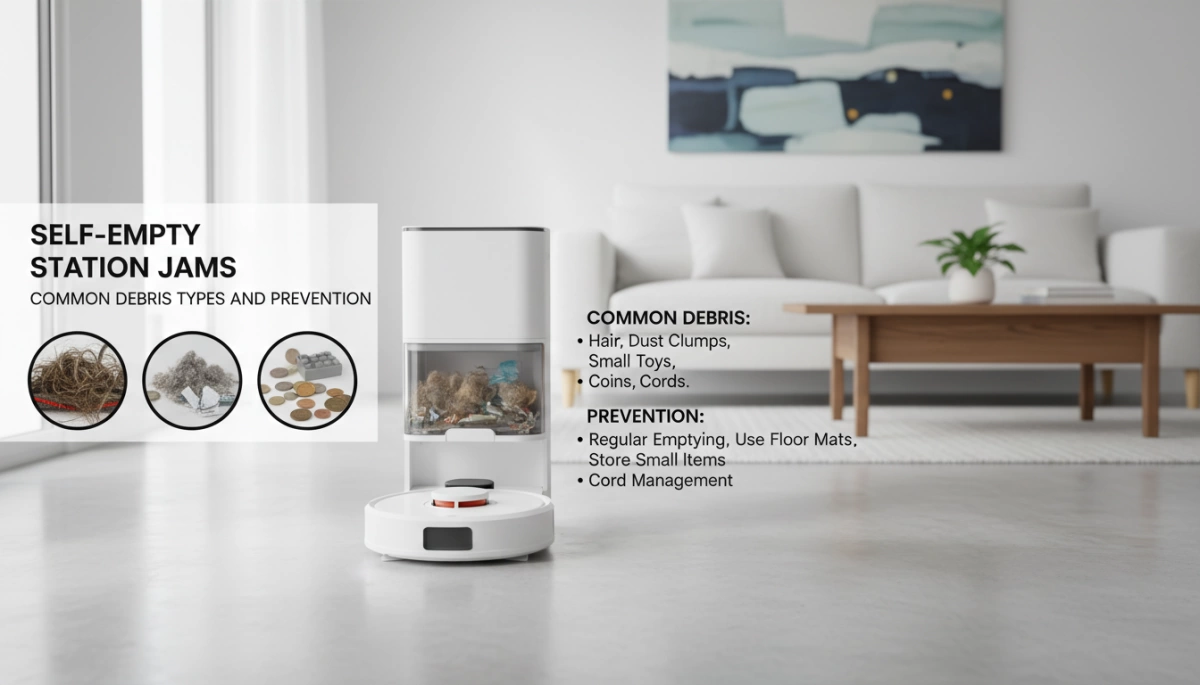
Self-empty station jams often start with the kind of debris your robot vacuum is trying to handle. Pet hair and human hair are big culprits—long strands easily tangle in brushes and form dense clumps that get stuck during the dustbin evacuation. Then there are large particles like pet food kibble, small toys, paper clips, or even earrings that can block narrow air ducts or tubes in the dock.
Another common issue is dust and fine debris buildup. When the robot’s onboard dustbin gets overfilled, these fine particles compact into hard masses that resist suction, causing the self-empty dock to jam. Fibrous materials such as strings, threads, rug fringes, or tiny fabric scraps can wrap around internal components, slowing down or blocking debris transfer.
Lastly, moisture-related clogs happen when damp debris or occasional wet spots cause particles to stick inside the ducts or intake tubes, further increasing the chance of a jam.
Understanding these debris types helps prevent robot vacuum emptying problems and keeps your auto-empty station running smoothly. For tips on maintaining your vacuum brushes and avoiding tangles, check out this detailed guide on robotic vacuum side brushes.
Why Jams Happen: Root Causes
Self-empty station jams mostly come down to a few common causes. First, an overloaded robot dustbin is a major culprit—this happens when the vacuum isn’t run often enough or if you live in a high-shed environment with lots of pet hair. The dustbin fills quickly, making it harder for debris to evacuate smoothly.
Next, many docking stations have narrow air ducts or designed bottlenecks that are prone to blockages. These tight spots easily trap hair, dust, or large debris, leading to clogs in the evacuation path.
Improper installation also causes jams. For example, if the brush cover isn’t seated correctly or the dustbin used isn’t compatible with the dock, the transfer of debris can be interrupted. Even small misalignments can lead to suction issues or blockages.
Finally, lack of regular maintenance lets dust and debris gradually build up inside the station. Over time, this slows down suction and makes jams more frequent and harder to clear. Keeping up with cleaning routines for your vacuum brushes, filters, and dock parts is key to avoiding these problems.
For tips on maintaining your robot vacuum brushes and filters, check out this detailed guide on how to clean robot vacuum brushes and filters.
How to Clear a Jammed Self-Empty Station
First things first: unplug the dock and remove your robot vacuum to avoid any accidents. Start by inspecting the robot’s dustbin, filter, and evacuation port—clear out any visible clogs or debris. Next, check the self-empty station’s air duct, intake tube, and bag compartment for any blockages that might be causing the jam.
For stubborn clogs inside hidden tubes, use simple tools like a coat hanger, screwdriver, or a regular vacuum cleaner to carefully pull out tangled pet hair, dust, or large particles. Take your time to gently remove all debris to prevent damage to internal parts.
Once everything is clear, reassemble the components and run a manual empty cycle to test if the robot vacuum emptying process works smoothly again. If issues persist, consult detailed guides on proper robot vacuum filter cleaning and maintenance to ensure all parts function correctly.
Prevention Tips: Keep Your Self-Empty Station Running Smoothly
Preventing jams in your self-empty station starts with good habits and regular upkeep. Here’s how to keep your robot vacuum auto-empty clog-free and running seamlessly:
| Tip | Why It Helps |
|---|---|
| Run the vacuum often | Frequent emptying stops the onboard bin from overfilling, reducing dustbin evacuation issues and avoiding self-empty dock jams. Aim for daily runs or after each room. |
| Pre-clean high debris areas | Removing pet hair, crumbs, and large objects like toys manually keeps big particles from blocking narrow ducts and causing vacuum dock debris buildup. |
| Regular maintenance | Weekly cleaning of brushes, filters, and sensors ensures smooth suction. Empty the dock bag or canister every 30-60 days to prevent compacted masses and reduce repeated emptying attempts. |
| Use app features | Smart scheduling for mid-clean emptying or zone-specific runs helps manage heavy debris areas, minimizing dust and fibrous material clogs. |
| Choose compatible accessories | Genuine bags and anti-tangle brushes reduce tangling with pet hair and maintain steady airflow, cutting down robot vacuum emptying problems. |
| Home adjustments | Control pet hair by grooming pets regularly and keep cords cleaned and out of the way to minimize fibrous debris and moisture-related clogs. |
These simple steps help avoid common causes of self-empty station jams and keep your auto-empty system efficient. If you want to dive deeper into routine appliance care, you can also check out practical advice on maintaining your home devices like this guide on general tips to extend appliance life.
Stick to this routine, and you’ll reduce the chance of dealing with frustrating blockages while keeping your cleaning on autopilot.
Brand-Specific Insights and Fixes
Different robot vacuum brands have their own common jam issues and fixes worth knowing.
Roborock models often experience air duct bottlenecks. Make sure the brush cover is properly aligned, as a misaligned cover can cause transfer blockages. Running frequent empties helps prevent overloading and reduces the risk of jams, especially with pet hair buildup common in high-shed homes.
Roomba Clean Base users frequently face tube clogs caused by small objects like crumbs or tiny toys. To clear these, access the bottom panel for a thorough deep clean of the evacuation tube and intake area. Regularly checking the Clean Base helps avoid repeated clogging and keeps your dock running smoothly.
For other popular brands like Shark and Ecovacs, the focus should be on keeping filters clean and preventing dustbin overload. Homes with pets should run the vacuum more often and make sure to clear external debris manually. This helps reduce dense debris buildup that leads to self-empty dock jams.
For detailed tools and maintenance tips on similar household appliances, you might find this helpful while maintaining your robot vacuum station: our tool checklist for home appliances.
When to Seek Professional Help or Replacement
If your self-empty station keeps jamming even after you’ve cleared debris and followed maintenance steps, it might be time to call in a pro. Persistent jams often point to deeper problems like worn-out parts or motor strain that regular cleaning can’t fix. Watch for signs such as unusual grinding noises, reduced suction, or the robot struggling to dock properly. These symptoms could mean the air duct, evacuation tube, or motor needs professional attention or replacement.
Don’t ignore repeated issues, as forcing the vacuum to work through clogs can cause more damage. At this stage, having an expert inspect your vacuum’s filter system and dock components ensures a proper fix and extends your robot’s lifespan. If you suspect hardware wear, check out advice on diagnosing faults and choosing the right replacement parts to avoid ongoing dustbin evacuation issues and minimize downtime.
For more on identifying parts problems and when to replace them, take a look at our detailed guide on how to diagnose a faulty EVA motor and the benefits of using genuine parts.



Leave a Reply