
Remember that feeling? You’re deep into a project, fingers flying across the keys, and suddenly, that mushy, unsatisfying membrane keyboard just gives up. Or maybe it’s the click-clack of cheap plastic that drives you insane. I’ve been there. For years, I churned through “gaming” keyboards and “ergonomic” boards, always feeling like something was missing. The truth is, most people buy the wrong mechanical keyboard because they don’t know what actually matters. I’ve spent too much money and time figuring this out so you don’t have to. I’m cutting through the noise and telling you exactly what to look for, what to avoid, and my top picks for the world best mechanical keyboard.
Forget Membrane Keyboards Entirely
Look, I’m going to be blunt. If you’re serious about typing, gaming, or just enjoying your computer experience, ditch the membrane keyboard. Completely. They are a relic, a cost-cutting measure, and they offer zero tactile feedback, inconsistent actuation, and a generally miserable typing experience compared to a proper mechanical board. People buy them because they’re cheap, but that’s a false economy. You’ll replace them faster, hate using them daily, and never truly understand what you’re missing.
Why Membrane Boards Are a Waste
- Inconsistent Feel: Every key press feels slightly different. Some bottom out hard, others squish. This inconsistency slows you down and increases errors.
- Durability Issues: The rubber domes degrade over time, leading to keys that stick or don’t register presses reliably. I’ve had membrane boards fail within a year of heavy use.
- Lack of Customization: You’re stuck with what you get. No switch swapping, no keycap upgrades. You can’t tailor the experience to your preferences, which is half the fun and utility of mechanical keyboards.
The True Cost of “Cheap”
Many folks see a $20 membrane keyboard and think they’re saving money. But how much is your comfort and efficiency worth? A good mechanical keyboard will last five, ten, even fifteen years if cared for. It’s an investment. I still use a Keychron K2 from 2020 that feels as good as the day I bought it, with just some new keycaps. That’s a longevity you’ll never get from a membrane board. You buy once, you buy right.
Understanding Switches: My Hard-Won Guide
This is where most beginners get overwhelmed, and honestly, it took me a long time to figure out what I actually liked. There are three main categories of mechanical switches: linear, tactile, and clicky. Don’t listen to anyone who tells you one is “best for gaming” or “best for typing” unequivocally. It’s all personal preference, but here’s what I’ve learned after trying dozens of types.
Linear Switches: Smooth and Fast
Linear switches are what most gamers gravitate towards, and for good reason. They have a consistent, smooth travel from top to bottom, with no bump or click. Think of it like pressing a button with no resistance change until it bottoms out. Cherry MX Red and Gateron Red are the most common examples, with an actuation force around 45-50g. For me, they feel too light for typing. I make more mistakes. However, for rapid key presses in games like Valorant or Apex Legends, they’re fantastic. I’ve found lighter linear switches like Gateron Yellow (50g actuation, but a heavier bottom out) or even custom lubed Gateron Black (60g actuation) to be a better balance if you must go linear.
Tactile Switches: The Sweet Spot for Many
Tactile switches have a “bump” that you feel as you press the key down, signaling the actuation point. This is my personal favorite for general use and writing. It gives you feedback without the audible click, letting you know the key has registered without needing to bottom out. Cherry MX Brown is the classic example, but they’re often criticized for a weak, scratchy bump. I recommend Gateron Brown as a minimum, but much better options exist. My current go-to is Akko V3 Cream Blue Pro switches. They have a pronounced, smooth bump and a satisfying thocky sound when lubricated. Another excellent choice is the Glorious Panda, which offers a very sharp, satisfying tactile event, though they cost more at around $0.70 per switch.
Clicky Switches: Love Them or Hate Them
Clicky switches have both the tactile bump AND an audible click sound, usually generated by a small click jacket mechanism. Cherry MX Blue is the original. They can be incredibly satisfying for some, providing both auditory and tactile feedback. However, they are loud. Very loud. If you share an office or have roommates, they will likely hate you. I used them for a while, thought I loved them, then realized the constant noise was grating. If you work alone and want that typewriter-esque experience, go for it, but be warned. I’ve seen some innovative ones like Kailh Box Jades that have a very crisp, short click. They’re neat, but not for me long-term.
My Top 3 Mechanical Keyboards for 2026
After years of buying, building, and selling keyboards, these are the boards I keep coming back to or recommend without hesitation. They offer the best balance of features, build quality, and value.
-
Keychron Q1 Pro (QMK/VIA Wireless) – ~$180-200
This is my daily driver. The Q1 Pro is a tank. It’s a 75% layout, which means it’s compact but still has dedicated function keys and arrows. The aluminum body is heavy and eliminates any deck flex. It’s hot-swappable, so you can change switches without soldering. It comes with decent Keychron K Pro switches (Gateron-made) and doubleshot PBT keycaps. But the real magic is the gasket mount system and excellent acoustics out of the box. Plus, full QMK/VIA support means you can remap every key, create macros, and customize endlessly. Wireless connectivity is rock-solid. For the price, nothing else comes close in terms of premium feel and features. Don’t buy the non-Pro version – the wireless is a game changer.
-
Glorious GMMK Pro (Wired) – ~$170 (barebones)
The GMMK Pro popularized the enthusiast-grade, aluminum barebones kit for the masses. It’s a 75% layout, just like the Keychron Q1, and also features a gasket mount, hot-swappable sockets, and a rotary knob. It feels incredibly solid. The default stabilizers are okay but benefit from tuning. You’ll need to buy switches and keycaps separately, which adds to the cost but allows for full personalization. This is a great entry point into custom building without needing to source every single part. The software is decent, and it supports QMK/VIA. I’ve built three of these for friends, and they all love them. The barebones price means you’re looking at $250-300 total for a complete setup with good switches and keycaps.
-
Akko 5075S (Wired) – ~$100-120
If you want a fantastic mechanical keyboard experience without breaking the bank, the Akko 5075S is it. It’s a plastic-bodied keyboard, but the build quality is surprisingly good. It’s also a 75% layout with a rotary knob. What makes it special at this price is that it comes with Akko’s excellent proprietary switches (like the Cream Yellows or Cream Blues) and doubleshot PBT keycaps. It’s hot-swappable, has decent stabilizers, and even some foam for better acoustics. You get a lot of bang for your buck here. While it lacks the heft of aluminum or QMK/VIA support, the typing experience is leagues ahead of anything else at this price point. It’s a perfect starter board if you’re not ready for the full custom build journey.
Why Hot-Swappable is Non-Negotiable

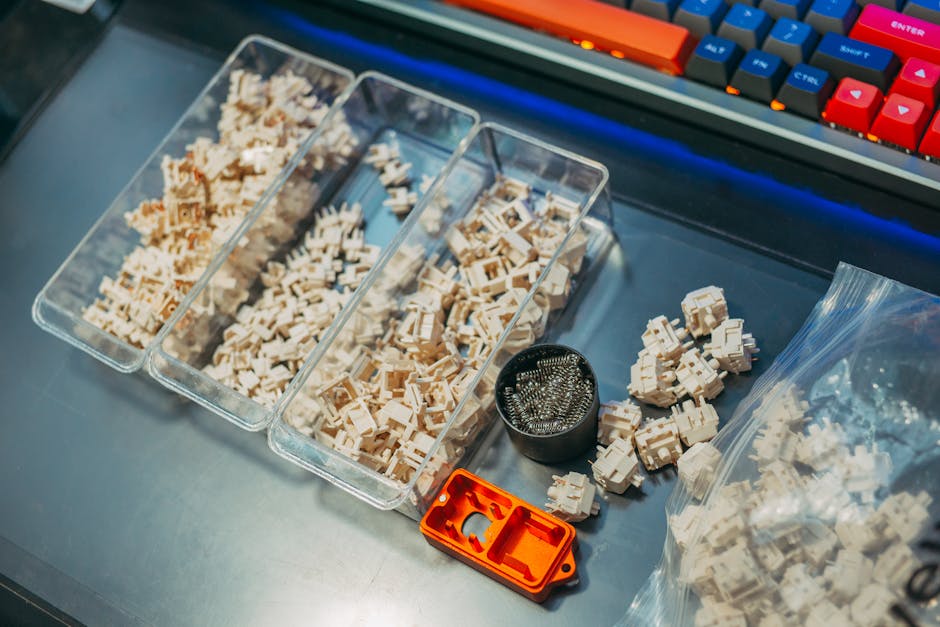
This is a short but critical point: your first (and probably all subsequent) mechanical keyboards absolutely must be hot-swappable. If it’s not, don’t buy it. This feature allows you to change switches without any soldering. It means you can experiment with different switch types, replace a faulty switch easily, and upgrade your typing feel down the line. It future-proofs your investment and lets you fine-tune your board as your preferences evolve. Seriously, don’t buy a soldered board unless you’re an experienced builder with specific, niche needs.
Common Mechanical Keyboard Questions I Get
Can I use mechanical keyboards for gaming?
Absolutely, and many gamers prefer them. The precise actuation, consistent feel, and durability of mechanical switches are often superior for competitive gaming. Linear switches like Cherry MX Reds or Gateron Yellows are popular for their fast, smooth presses, but even tactile switches can be great, depending on your preference. You get better response times and more reliable key registration than with squishy membrane boards.
Are mechanical keyboards loud?
They can be, yes, but not all of them. Clicky switches are the loudest, like Cherry MX Blues. However, tactile and linear switches can be relatively quiet, especially if you get factory-lubed switches or lube them yourself. Many enthusiasts also add sound-dampening foam to their keyboards to further reduce noise. My Keychron Q1 Pro with lubed Akko Cream Blue Pro switches is quieter than some office membrane keyboards.
What are PBT keycaps and why do they matter?
PBT (Polybutylene Terephthalate) keycaps are more durable and resistant to shine than ABS (Acrylonitrile Butadiene Styrene) keycaps, which are commonly found on cheaper keyboards. ABS keycaps tend to develop an oily, shiny look over time from finger oils, making them feel slick and cheap. PBT keycaps maintain their matte texture and feel much longer. They also often have a more satisfying sound profile. Always prioritize PBT, especially doubleshot PBT, for longevity and feel.
Keyboard Features: What You Pay For
Here’s a quick rundown of what differentiates price tiers in the mechanical keyboard world, based on my experience. You can see why some boards cost more.
| Feature/Component | Budget (<$80) | Mid-Range ($80-150) | Enthusiast (>$150) |
|---|---|---|---|
| Case Material | Plastic (ABS), sometimes thin. | Better quality plastic, some entry aluminum. | Full CNC aluminum, heavy, premium. |
| Mounting Style | Tray mount, rigid. | Tray mount, some plate foam. | Gasket mount, flex cut PCB for typing feel. |
| Switches Included | Basic Gateron/Outemu, often unlubed. | Akko, Gateron Pro, sometimes factory lubed. | Often sold barebones (no switches), allowing custom choice. |
| Keycaps Included | Thin ABS, laser etched legends. | Thicker ABS or entry PBT, doubleshot. | Thick doubleshot PBT, often custom profiles. |
| Stabilizers | Plate mounted, often rattly. | Plate mounted, sometimes pre-lubed. | Screw-in PCB mounted, often pre-tuned, high quality. |
| Software/Firmware | Basic proprietary software, limited remapping. | Better proprietary software, some macro support. | QMK/VIA compatibility, open-source, limitless customization. |
| Connectivity | Wired (USB-C). | Wired, sometimes basic Bluetooth 5.0. | Wired, robust 2.4GHz wireless + Bluetooth 5.1. |
| Sound Profile | Hollow, plasticky. | Decent, less hollow. | Thocky, clacky, muted – depends on build. Excellent acoustics. |
As you can see, spending more gets you better materials, more sophisticated internal design (like gasket mount for a softer typing feel), higher quality components, and far greater customization options. The jump from budget to mid-range is significant, but the jump from mid-range to enthusiast is where the real “endgame” quality comes in.
The Case for Customization: Beyond Off-the-Shelf
The beauty of mechanical keyboards isn’t just in finding a good one; it’s in making it truly yours. This is where the enthusiast hobby really shines. Many people, myself included, start with an off-the-shelf board like an Akko or a pre-built Keychron. But eventually, you might want to dive deeper. Customization isn’t just for the hardcore hobbyists; it’s a path to a truly personalized typing experience that no mass-produced keyboard can offer.
Modding Your Keyboard
Even if you buy a pre-built board, you can usually mod it. Common mods include:
- Lubing Switches: This involves applying a thin layer of specialized lubricant to the switch stems and springs. It drastically improves smoothness, reduces spring ping, and enhances the sound profile. It’s time-consuming but incredibly rewarding.
- Lubing Stabilizers: Stabilizers are the components that support larger keys like the spacebar, shift, and enter. Properly lubing and tuning them (sometimes called the “Holee Mod” or using special pads) eliminates rattle and makes these keys feel buttery smooth. This is one of the most impactful mods you can do.
- Adding Foam: Many keyboards benefit from adding plate foam, case foam, or even PE foam (Polyethylene foam) between the PCB and plate. This helps fill empty spaces, reducing hollowness and creating a deeper, more satisfying “thocky” sound.
- Keycap Swapping: Changing keycaps is the easiest way to customize the look and feel of your keyboard. Different profiles (Cherry, SA, OEM, XDA, MDA) offer distinct typing experiences, and the material (PBT vs. ABS) impacts sound and durability.
The QMK/VIA Advantage
When I recommend boards like the Keychron Q1 Pro or GMMK Pro, it’s often because of their QMK/VIA compatibility. These are open-source firmware solutions that give you unparalleled control over your keyboard’s layout and functionality. You can remap any key, create complex macros, add multiple layers for different functions (e.g., a gaming layer, a programming layer), and even customize RGB lighting effects. This level of control means your keyboard adapts to you, not the other way around. Once you’ve used a QMK/VIA board, going back to proprietary software feels incredibly restrictive.
My Final Take on the Best Buys
I’ve been through a lot of keyboards. My advice is simple: if you want the absolute best typing experience and aren’t afraid to spend a bit, go for the Keychron Q1 Pro. It’s an incredible value for a full aluminum, gasket-mounted, wireless board with QMK/VIA. If you’re on a tighter budget but still want something excellent, the Akko 5075S is your winner. Either way, make sure it’s hot-swappable, because your journey with mechanical keyboards is just beginning.